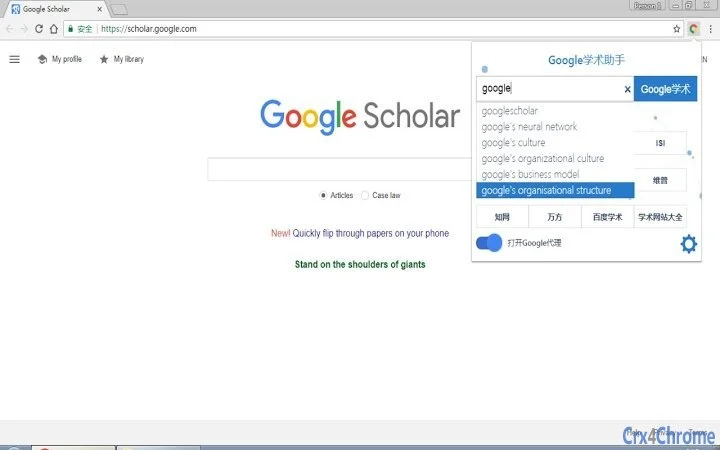

Google Scholar Assistant: Fast Academic Access
The Google Scholar Assistant is a desktop application designed to streamline access to Google and Google Scholar, along with a suite of academic and research-oriented websites. It aims to simplify the process of conducting scholarly research by providing one-click access to essential tools such as Google, Google Scholar, Gmail, and the Chrome Web Store. The software also includes direct links to major academic databases and repositories like Wanfang, CNKI, Baidu Scholar, Sci-Hub, Library Genesis, OALib, ISI Web of Science, and The Pirate Bay. This makes it particularly useful for researchers, students, and professionals engaged in academic work who frequently need to navigate between multiple platforms.
Target users include individuals in higher education, scientific research, and technical writing who rely on quick access to international and domestic academic resources. The application is tailored for users in China, with interface behavior and workflow patterns adjusted to align with local user habits. It supports keyboard shortcuts such as Alt + G to toggle the interface, and offers navigation through search suggestions using up and down arrow keys. In cases where standard proxy connections fail, the software defaults to using Google mirror search, ensuring continued access to core services.
Key Features & Capabilities
- One-Click Access to Google and Google Scholar – Launch Google or Google Scholar instantly from the desktop interface, reducing time spent on navigation and login processes.
- Right-Click Google Scholar Search – Users can right-click any selected text to initiate a Google Scholar search, enabling rapid academic query execution without switching contexts.
- Automatic Fallback to Google Mirror Search – When proxy or VPN connections are unavailable, the software automatically switches to a Google mirror search, maintaining access to essential information.
- Integrated Academic Website Directory – Built-in access to a curated list of academic platforms including Wanfang, CNKI, Baidu Scholar, Sci-Hub, Library Genesis, OALib, ISI Web of Science, and The Pirate Bay.
- Customizable Keyboard Shortcuts – The Alt + G shortcut allows users to show or hide the interface, while up and down arrow keys support selection from search suggestions.
- One-Click Access to Academic Website Directory – If the listed sites do not meet user needs, an option to open a comprehensive academic website list is available for broader discovery.
These features are designed to enhance workflow efficiency, especially for users who frequently perform academic searches, retrieve research papers, or manage scholarly communications. The integration of multiple platforms into a single interface reduces browser tab overload and streamlines research tasks. The right-click functionality is particularly beneficial for quick literature reviews or citation verification.
User Interface, Workflow & Performance
The application features a compact, minimalistic interface that can be toggled on and off using the Alt + G shortcut. The layout is structured to prioritize access to core services, with clearly labeled buttons for Google, Google Scholar, Gmail, and the Chrome Web Store. Navigation through search suggestions is supported via standard keyboard arrow keys, enhancing usability for power users. The interface is designed to remain unobtrusive when hidden, minimizing screen clutter.
Workflow efficiency is improved by consolidating multiple tools into one application, reducing the need to switch between multiple browser tabs or applications. The ability to initiate searches directly from selected text supports a seamless research process. However, exact performance details such as CPU or RAM usage were not specified by the developer. General software behavior suggests stable operation under typical conditions, though performance may vary depending on system configuration and network stability. The application’s reliance on external services means that actual responsiveness depends on internet connectivity and the availability of mirrored or proxy endpoints.
Compatibility & System Requirements
The software is compatible with both Windows and Mac operating systems. It is available in version 1.0.0 and has a file size of 20 MB, indicating a lightweight installation. The developer did not specify exact system requirements, such as minimum RAM, processor speed, or disk space beyond the installation size. Compatibility information was partially provided, with no mention of specific versions of Windows or macOS. Users are advised to ensure their system meets general desktop application requirements for smooth operation.
Installation is straightforward, with no reported setup complexity. The application does not require administrative privileges for basic functionality, though access to certain features may depend on network settings and browser configurations. The developer did not provide information on background processes, startup behavior, or integration with system services.
Pros and Cons
Pros
- One-click access to Google, Google Scholar, and Gmail
- Right-click search functionality for quick academic queries
- Automatic fallback to Google mirror when proxy fails
- Integrated access to multiple academic databases and repositories
- Keyboard shortcuts for efficient interface control
- Designed with Chinese user habits in mind
- Lightweight at 20 MB
Cons
- Default homepage set to www.2345.com, which may be undesirable for some users
- Reliance on proxy and mirror services, which may be unstable or blocked
- Exact system requirements not publicly disclosed
- Use of third-party academic sites may raise legal or ethical concerns depending on jurisdiction
- Security and data handling practices were not detailed by the developer
FAQ Section
Is Google Scholar Assistant compatible with Windows and Mac?
Yes, the software is compatible with both Windows and Mac operating systems as stated in the product information.
Does the software require a VPN or proxy to function?
The application supports proxy and VPN usage for accessing Google and academic resources, but it includes a fallback to Google mirror search when such connections are unavailable.
Can I change the default homepage from www.2345.com?
The software sets www.2345.com as the default homepage to support server maintenance. While the application does not currently provide a built-in option to change this, users may manage their browser settings independently.
Is the software safe to use?
The application does not disclose its security protocols or data handling practices. Users should exercise caution and ensure their system is protected with up-to-date antivirus software.
Does the software support offline use?
As the software relies on online services such as Google, Google Scholar, and external academic websites, it requires an active internet connection and does not support full offline functionality.
Final Thoughts + CTA
The Google Scholar Assistant offers a streamlined, user-centric solution for academic researchers and students who need fast access to a wide range of scholarly resources. Its integration of Google, Google Scholar, and multiple academic databases into a single desktop interface enhances productivity and reduces workflow friction. The inclusion of right-click search, keyboard shortcuts, and automatic fallback mechanisms further improves usability, particularly for users in regions with restricted access to international academic platforms.
While the default homepage setting may be a drawback for some, the software’s lightweight design, compatibility with both Windows and Mac, and focus on Chinese user preferences make it a compelling tool for academic work. The ability to access mirror sites and a curated list of academic repositories adds significant value for researchers seeking alternative sources.
For anyone engaged in scientific research or academic writing, this desktop application delivers a practical, efficient way to stay connected to essential resources. Download Google Scholar Assistant now.







